When you stop the birds in the morning, a small ring appears at the top of the Wake log. This is the Night Ring. Tap it, and it opens on a screen called The shape of last night.
With “Previous night” and “Next night” at the top of that screen, you can go back through the rings of earlier nights (from version 1.4). Days with no record are skipped. While you are looking at an earlier night, the title changes from “The shape of last night” to that night’s date.
When you went to bed and when you got up. When the sun set that evening and when it rose. Whether you picked up your iPhone in the night. The ring puts all of this on one 24-hour clock face.
The app screens on this page are real nights of the app’s maker, Akito Haga.
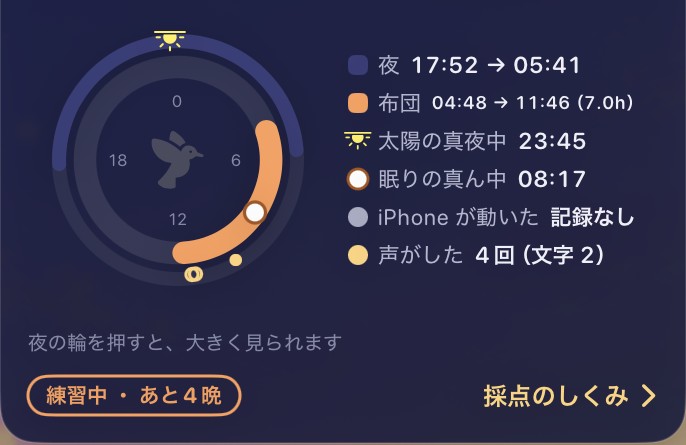
How to read the ring
Unlike an ordinary clock, the Night Ring goes once around in 24 hours. Midnight (0:00) is at the top and noon is at the bottom. Time runs clockwise: the right half is from midnight to noon, the left half from noon to midnight.
Note: the Sky Ring on the home screen, where you set the time, has 6:00 at the top. The two rings face different ways.
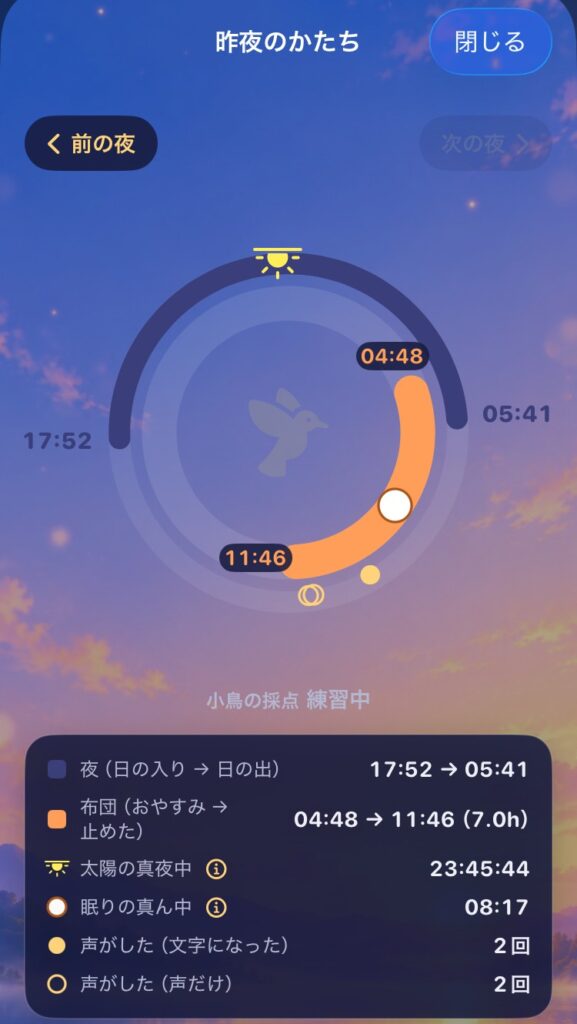
| What you see | What it means |
|---|---|
| Outer navy arc | Night: from the previous evening’s sunset to this morning’s sunrise |
| Inner orange arc | In bed: from pressing “Good night” to stopping the birds |
| Faint part of the inner arc | Time you were still looking at the screen after “Good night” |
| Yellow star | Solar midnight |
| White ring | Mid-sleep |
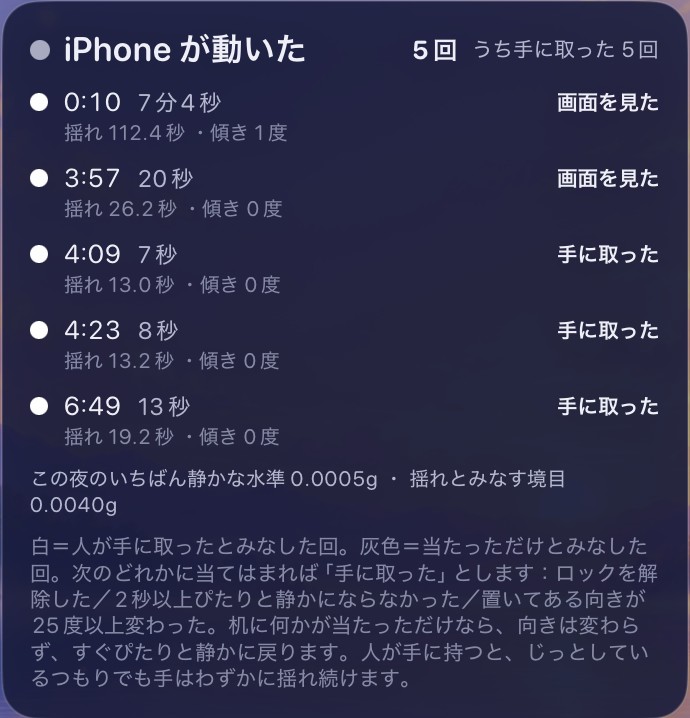
| Small dots inside | When the iPhone moved. White: picked up. Grey: just bumped |
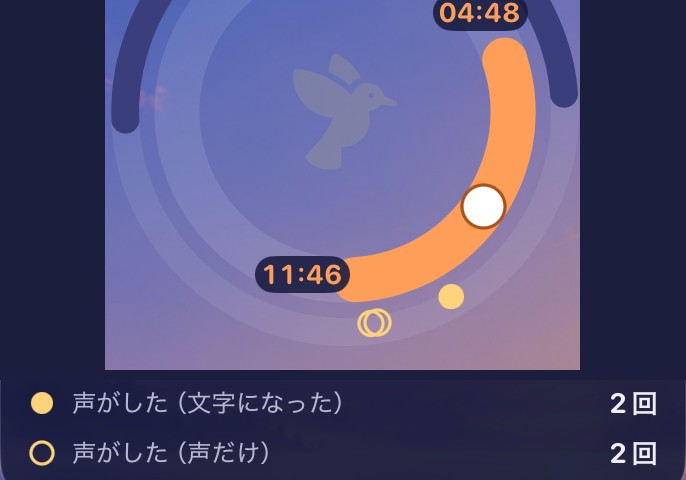
| Gold circles outside | When a voice was heard (from version 1.4) |
| Bird in the middle | Your bird. It grows as your morning answers add up |
The night and the time in bed are drawn as two separate arcs instead of one. On a morning when you stay in bed past sunrise, a single ring would hide the end of the night under the bed arc. With two arcs, you can see at a glance which came first: the end of your time in bed, or sunrise.
Solar midnight
0:00 on the clock is not solar midnight.
Solar midnight is exactly 12 hours after the moment the sun is highest in the sky (solar noon). Clocks follow a time zone, not the sun above you, so solar midnight shifts depending on where you live. And because the Earth’s orbit is not a perfect circle and its axis is tilted, it also moves a little through the seasons, even in the same place.
The app works out solar midnight for your location and that day, with the same calculation it uses for sunrise and sunset. That is why it can show it to the second.
Whether mid-sleep is far from solar midnight is one of the items the Bird’s score looks at. But the app does not decide that closer is better. Whether it is good or bad for you, the bird learns from your answers each morning.
Mid-sleep, and the time you tried to sleep
- Mid-sleep: the exact midpoint between getting into bed and waking up.
- Time you tried to sleep: after “Good night”, if the phone locks and stays locked for 15 minutes, the moment it locked. It is not the time you fell asleep. Once it is set, it does not move for the rest of the night.
For both, the original ideas and how this app’s calculation differs are explained on Evidence Behind the Analysis.
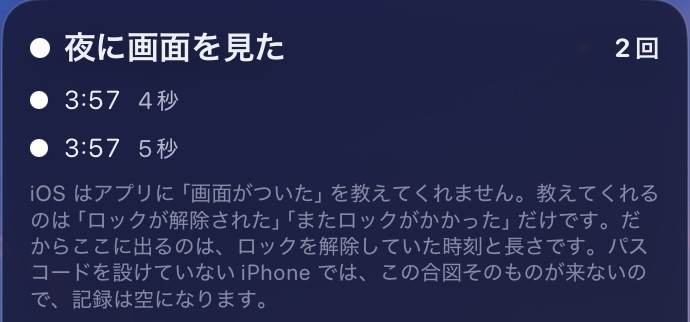
Looked at the screen at night
The times after “Good night” when the iPhone was unlocked, and for how long.
iOS does not tell apps when the screen turns on. It only says “unlocked” and “locked again”. So what appears here is when the phone was unlocked, and for how long. On an iPhone with no passcode, this signal never comes, so the record stays empty.
iPhone moved
The times during the night when the iPhone, lying on a bedside table or desk, moved.
The line for “moved” is not fixed in advance. It is set at three times the quietest level measured by that iPhone on that night (at least 0.004 g), because that level changes with the surface and with the model.
Each movement is sorted into “Picked up” or “Just bumped”. It counts as picked up if any of these is true:
- the phone was unlocked
- it did not go perfectly still for 2 seconds or more
- the angle it was lying at changed by 25 degrees or more
If something just knocked the table, the angle stays the same and everything goes still again at once. When a person holds a phone, the hand keeps moving slightly, even when trying to keep still.
If you sleep with your iPhone in the bed, every time you turn over would count as a movement. Turn on “iPhone stays in bed” in Settings, and movements are not counted for that night. Whether it was on or off is kept for each night, so changing it later does not change how earlier nights look.
Voice (from version 1.4)
Of the recordings made by “Last night’s sounds”, those that sound 75% or more like a human voice, or that became text, are drawn as gold circles outside the ring. A filled circle means it became text; an outline means voice only. On the large screen, the list under the ring shows how many of each: “Voice (became text)” and “Voice (voice only)”.
These marks are copied into the morning record. Even if you delete the recordings later, the gold circles stay on the rings of those nights.
The bird in the middle
Your bird sits in the middle of the Night Ring. While you have answered only a few mornings, it is a faint shadow. As your answers add up, it changes.
The Bird’s score is shown just above the ring, not inside it. Writing the same number in two places means that one day they will disagree.
The Bird’s score, and how the bird grows, are explained on Evidence Behind the Analysis.
What the app cannot know
- The iPhone cannot know whether you were really asleep. The in-bed arc runs from “Good night” to “Stop”; it is not the time you slept.
- For looking at the screen, unlocking is the only clue. Times you read a notification on the lock screen without unlocking are not included.
- Movement is only how the place where the iPhone lies shook. It does not measure how your body moved.